When enabled, Atomic Search provides analytics on “Recent searches and top phrases/words” searched by students in a course represented by a report and a graph. This is hidden from students.
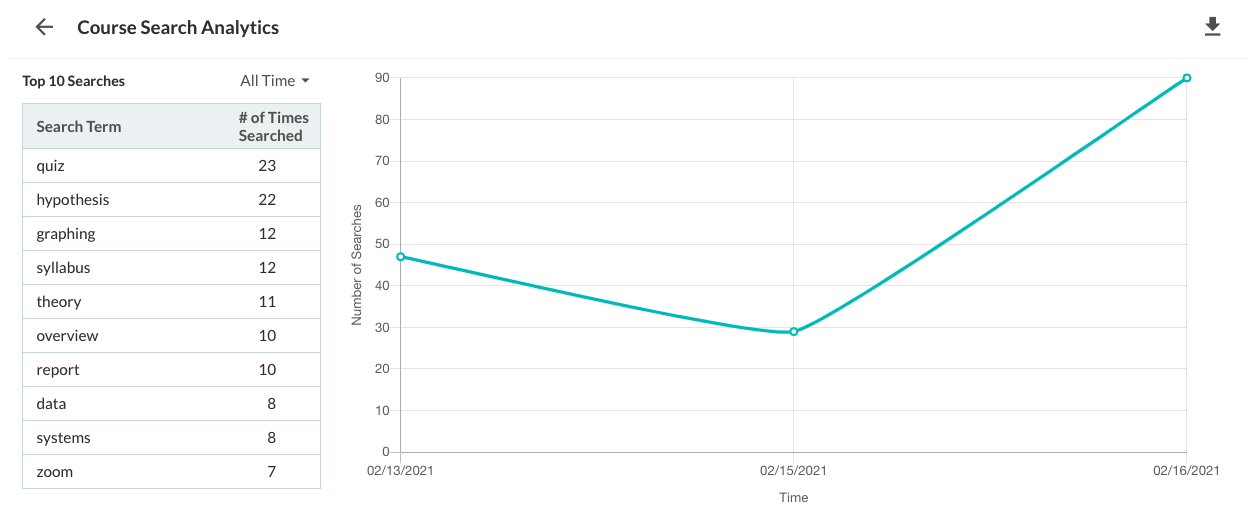
Figure 1: Search course analytics
Report
The Report section lists (by default for the last 7 days):
-
Top 10 Phrases: Top phrases/words that were searched by students in a course during the specified time period
-
Number of Searches: Number of times the phrase/word was searched
This section provides the ability to filter based on a specific time frame or by All-time in the course.
Graph
The Graph section lists the number of searches with:
-
Time along the X-axis: each day of the last 100 days
-
Number of searches along the Y-axis: total searches performed every day
When a user hovers over the number for each day in the Graph section, the top 5 phrases/words searched on that day is displayed.
Export course search analytics
Admins can download a CSV export of all words/phrases searched for all time in the course. To export the CSV, click on the "Save search results" option in the three-dot menu.
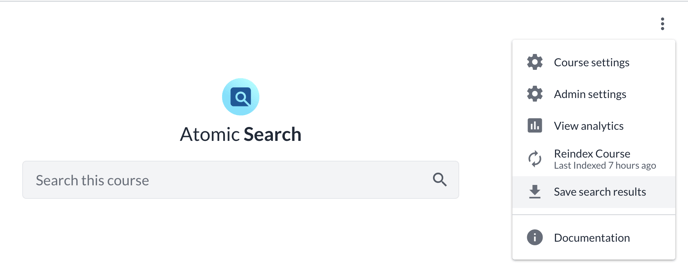
Figure 2: Save search results button location
Account analytics are updated once a day, at Midnight UTC.