Skip to content
English
  • There are no suggestions because the search field is empty.

Enabling Canvas Data 2 access for Atomic Search Indexing

The CD2 APIs do not currently provide a way to issue credentials that limit which data can be retrieved (table-scoped API keys). Atomic Jolt has requested this capability, and Instructure has committed to implementing it before October 1, 2026. Once table-scoped keys are available, we will provide instructions for creating a key limited to only the tables Atomic Search needs.


How to set up CD2 access for Atomic Search indexing

  1. Go to identity.instructure.com
  2. Select your institution and log in
  3. Create a new key.
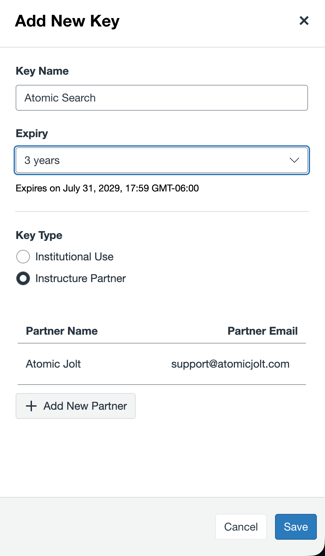
    1. Click 'Add New Key'
    2. Choose a name like 'Atomic Search'
    1. Expiry: max (3 years)
    2. Key type:
      1. Instructure Partner - Atomic Jolt
      2. Partner Email: support@atomicjolt.com

        Screenshot 2026-07-31 at 3.24.02 PM
  1. This will send an email to Atomic Jolt containing a link to retrieve the CD2 credentials. You will see the status on if Atomic Jolt has accessed the keys. The key status shows as Pending until clicked by Atomic Jolt.